最近开发一个python程序,使用到dict初始化loggin,也好,写遍博文记录一下。
为了了解程序运行的情况,诞生了日志,在python下做开发以来写过用过多多少少的日志模块。用来用去还是内置的logging模块用得比较爽,使用的话也比较简单。
import logging |
机制概念
logging与log4j机制是一样的,而实现起来有一些不同,都有以下的概念
- loggers,定义日志对象,对应于代码中的logging.getLogger(name)以获取日志对象,单例模式。这里存在一个名为’root’的默认日志对象,所有不指定名字的输出都归为root日志对象处理。
- handlers,日志处理者,我们在这里定义了输出文件、输出终端、输出网络、输出syslog、输出邮件等,每个handler可以定义不同的日志级别,得以实现日志分级输出。
- fotmater,定义日志行格式,只需要两个参数:消息的格式字符串和日期字符串,这两个参数都是可选的。
- filters,为确定哪些日志记录提供更细粒度的功能输出。
logging内部流程
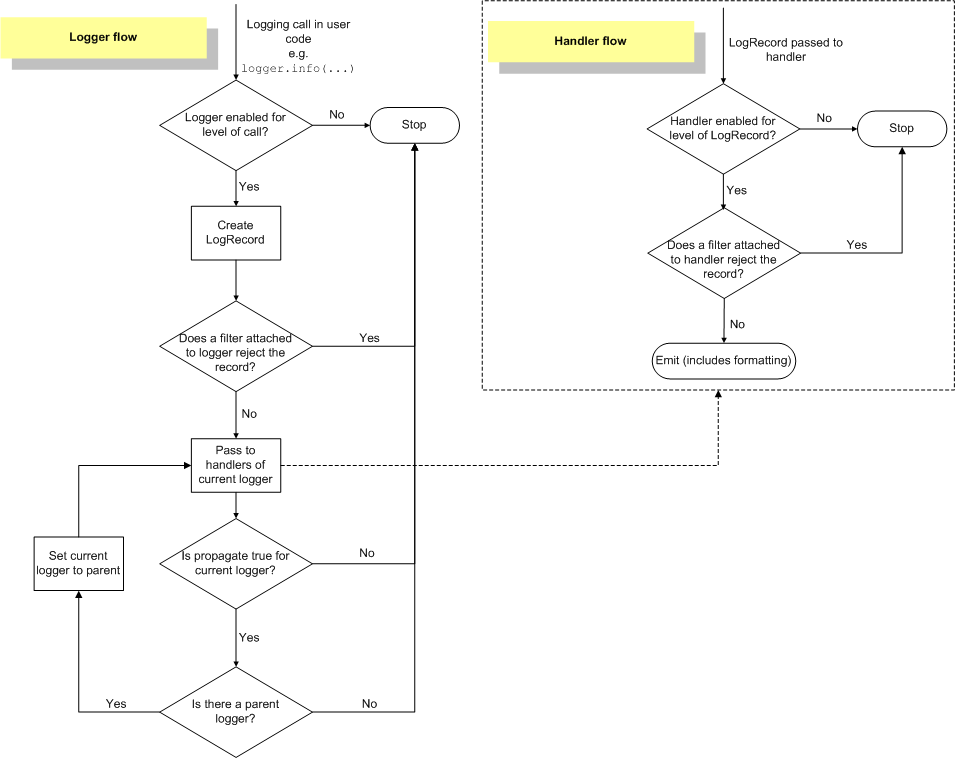
handler说明
handler在logging中的作用是处理日志,可以有如下几类日志处理类
import logging.handlers |
在代码中可以自定义添加handler
logging.addHandler(handlerObject) |
| Handler | Description |
|---|---|
* StreamHandler |
instances send messages to streams (file-like objects). |
FileHandler |
instances send messages to disk files. |
| BaseRotatingHandler | is the base class for handlers that rotate log files at a certain point. It is not meant to be instantiated directly. Instead, use RotatingFileHandler or TimedRotatingFileHandler. |
* RotatingFileHandler |
instances send messages to disk files, with support for maximum log file sizes and log file rotation. |
TimedRotatingFileHandler |
instances send messages to disk files, rotating the log file at certain timed intervals. |
SocketHandler |
instances send messages to TCP/IP sockets. |
DatagramHandler |
instances send messages to UDP sockets. |
SMTPHandler |
instances send messages to a designated email address. |
SysLogHandler |
instances send messages to a Unix syslog daemon, possibly on a remote machine. |
NTEventLogHandler |
instances send messages to a Windows NT/2000/XP event log. |
MemoryHandler |
instances send messages to a buffer in memory, which is flushed whenever specific criteria are met. |
HTTPHandler |
instances send messages to an HTTP server using either GET or POST semantics. |
WatchedFileHandler |
instances watch the file they are logging to. If the file changes, it is closed and reopened using the file name. This handler is only useful on Unix-like systems; Windows does not support the underlying mechanism used. |
NullHandler |
instances do nothing with error messages. They are used by library developers who want to use logging, but want to avoid the ‘No handlers could be found for logger XXX’ message which can be displayed if the library user has not configured logging. See Configuring Logging for a Library for more information. |
其中NullHandler,StreamHandler和FileHandler定义在logger中,而其他handler则定义在子模块logging.handlers.
如果上面的Handler还不能满足需求,可以自行编写Handler。
注:上表中行头带*号为我们开发过程中最常用的Handler
formater说明
格式表
| Format | Description |
|---|---|
| %(name)s | Name of the logger (logging channel). |
| %(levelno)s | Numeric logging level for the message (DEBUG, INFO, WARNING, ERROR, CRITICAL). |
| %(levelname)s | Text logging level for the message (‘DEBUG’, ‘INFO’, ‘WARNING’, ‘ERROR’, ‘CRITICAL’). |
| %(pathname)s | Full pathname of the source file where the logging call was issued (if available). |
| %(filename)s | Filename portion of pathname. |
| %(module)s | Module (name portion of filename). |
| %(funcName)s | Name of function containing the logging call. |
| %(lineno)d | Source line number where the logging call was issued (if available). |
| %(created)f | Time when the LogRecord was created (as returned by time.time()). |
| %(relativeCreated)d | Time in milliseconds when the LogRecord was created, relative to the time the logging module was loaded. |
| %(asctime)s | Human-readable time when the LogRecord was created. By default this is of the form “2003-07-08 16:49:45,896” (the numbers after the comma are millisecond portion of the time). |
| %(msecs)d | Millisecond portion of the time when the LogRecord was created. |
| %(thread)d | Thread ID (if available). |
| %(threadName)s | Thread name (if available). |
| %(process)d | Process ID (if available). |
| %(message)s | The logged message, computed as msg % args. |
配置
python的logging可以有以如下几种方式实现初始化
代码
import logging |
运行后结果
$ python simple_logging_module.py |
dict对象
logging.config模块提供着dictConfig,可以从python字典对象中加载自定义的配置。
正好,我在自行编写的程序中用到了,不过我是从json中初始化dict对象,然后再把dict对象传递给logging.config.dictConfig(dictObject),借此函数完成logging的配置。
当然,也可以从yml中初始化这个dict对象,不过这个没有涉及,文档官网则有例子。
我的json文件:
{ "logger_conf": { |
初始化代码
import logging |
使用dictConfig()函数初始化logging,可以把logging配置写进程序的json配置中而不用再单独一个日志配置json文件,洁癖比较浓,捂脸~
ini配置文件
import logging.config |
logging.conf配置文件案例[loggers]
keys=root,simpleExample
[handlers]
keys=consoleHandler
[formatters]
keys=simpleFormatter
[logger_root]
level=DEBUG
handlers=consoleHandler
[logger_simpleExample]
level=DEBUG
handlers=consoleHandler
qualname=simpleExample
propagate=0
[handler_consoleHandler]
class=StreamHandler
level=DEBUG
formatter=simpleFormatter
args=(sys.stdout,)
[formatter_simpleFormatter]
format=%(asctime)s - %(name)s - %(levelname)s - %(message)s
datefmt=